
How much money should each bot get, which leverage should you choose, why keep a reserve, and how do limits protect your account? Let’s work through an example exchange account with $10,000. All numbers below are an example calculation, not a recommendation of a specific amount.
Important: bots and ready-made settings don’t guarantee profit. Leverage increases both profits and losses. Choose amounts and leverage that match your risk tolerance.
1. What a bot’s deposit is
A bot’s deposit is the margin the bot will use once its whole order grid is filled. The maximum position on the exchange equals the deposit times the leverage:
Position = deposit × leverage. For example, $625 at 5x leverage means a position of up to $3,125.
A trade starts with a first, small order. The next grid orders fill only if the price moves against the position, and each next order is bigger than the previous one. So at the start of a trade only a small part of the deposit is used, and all of it is used only in a deep drawdown.
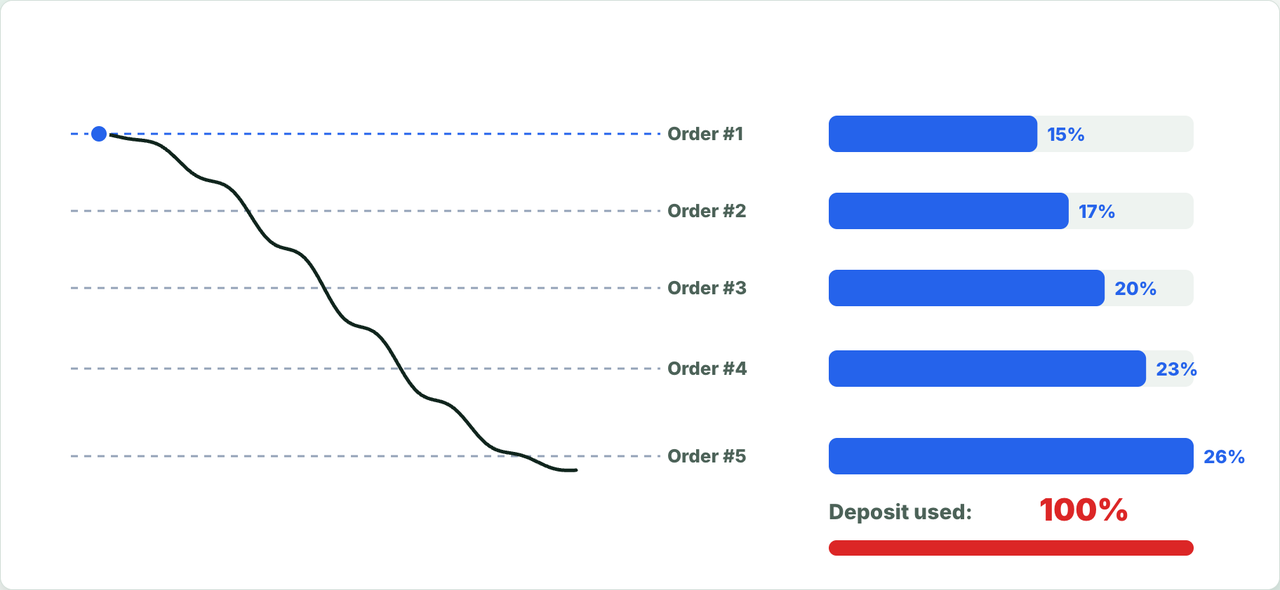
With a 5-order grid as an example: the first order uses about 15% of the deposit, after the second it’s about 32%, after the third about 51%, after the fourth about 74%, and only the fifth order brings deposit usage to 100%.
2. Which leverage to choose
Leverage makes the position bigger for the same deposit, but the liquidation risk grows with it.
- 2x–3x - to lower the risk;
- up to 5x - the recommended maximum for DCA grids;
- above 5x - the liquidation risk grows noticeably.
3. Why you need a reserve on the account
While the price moves against the trade, a floating loss grows on the account. It’s covered by the free money on the exchange. If there isn’t enough, the exchange can force-close the position - that’s liquidation.
That’s why part of the balance should stay in reserve. Usually you keep 2–3 times the bot’s deposit on the account for each bot: the deposit itself plus a reserve of the same size (1:1 allocation) or twice as large (1:2). In other words, a third to a half of the balance goes to the bots.
| Allocation (bots : reserve) | For bots | In reserve | On the account per bot |
|---|---|---|---|
| 1:1 | ½ of the balance | ½ of the balance | 2× the bot deposit |
| 1:2 | ⅓ of the balance | ⅔ of the balance | 3× the bot deposit |
4. Calculating the amount per bot in the Bots Wizard
The easiest way to calculate the amounts is the Bots Wizard:
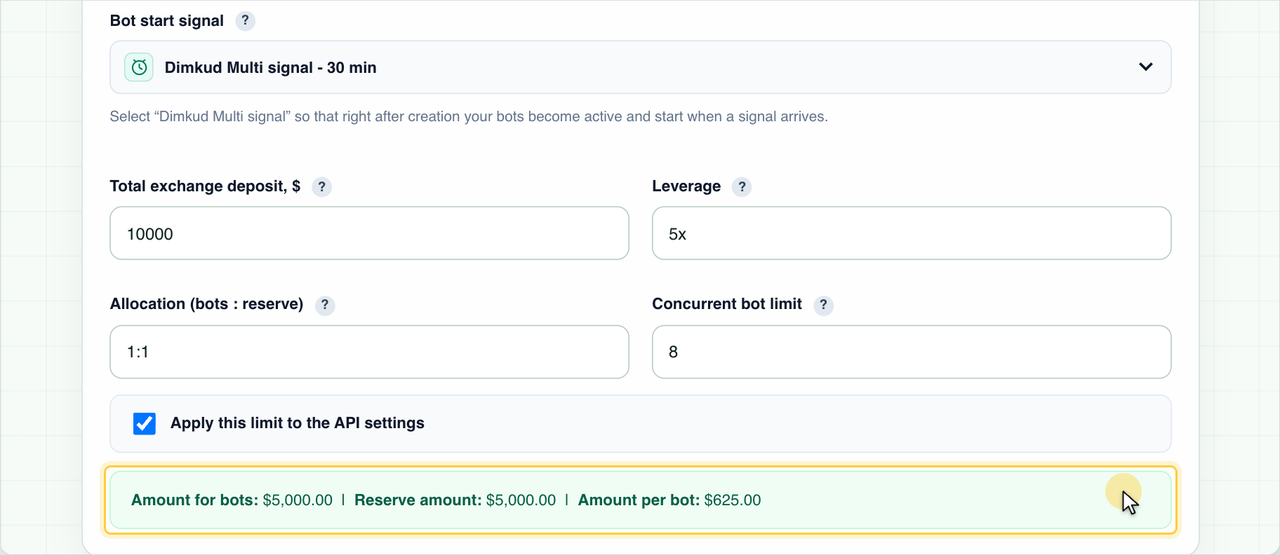
- Total exchange deposit - the whole amount you allocate to the bots, including the reserve. In the example - $10,000.
- Leverage - for example, 5x.
- Allocation (bots : reserve) - for example, 1:1.
- Concurrent bot limit - how many trades can be open at the same time. In the example - 8.
The wizard shows the result right away: $5,000 for the bots, $5,000 in reserve and $625 per bot. The formula is simple: amount for bots ÷ concurrent bot limit = $5,000 ÷ 8 = $625.
More about the wizard:
How to create multiple bots with Bot Wizard
5. Why limit the number of concurrent trades
You can create more bots than the concurrent trade limit: for example, 15 bots with a limit of 8. There are two reasons for this.
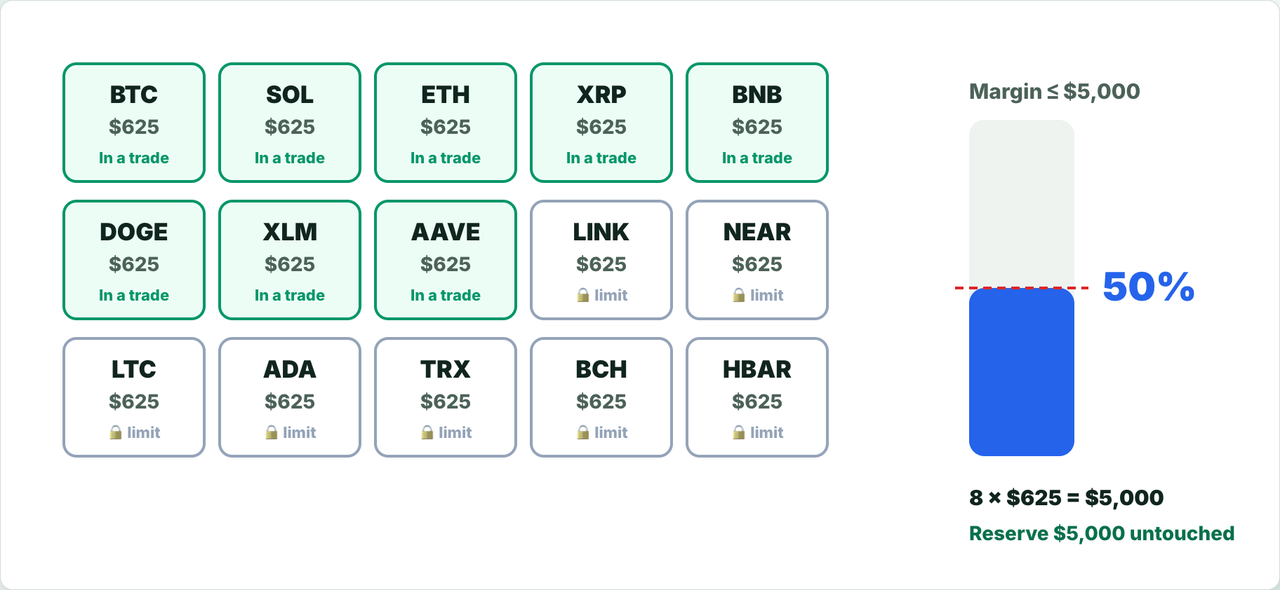
Your money is used more fully. If the $5,000 allocated to the bots is split across all 15 bots, each gets about $333. But all 15 bots rarely start at once, so part of the money just sits idle. With a limit of 8, each bot gets $625, and 8 simultaneous trades happen much more often - on average the deposit works more fully.
| 15 bots, no limit | 15 bots, limit 8 | |
|---|---|---|
| Amount per bot | ≈ $333 | $625 |
| Money usage | a noticeable part sits idle | the deposit works more fully |
| Maximum concurrent trades | 15 | 8 |
The limit protects your margin. Even if signals arrive for every coin at once, no more than 8 trades will open, and the margin stays within the calculated $5,000 - the reserve stays untouched. The other bots skip this signal and stay in “Waiting for signal” until the next one.
6. Launch limits in the API key settings
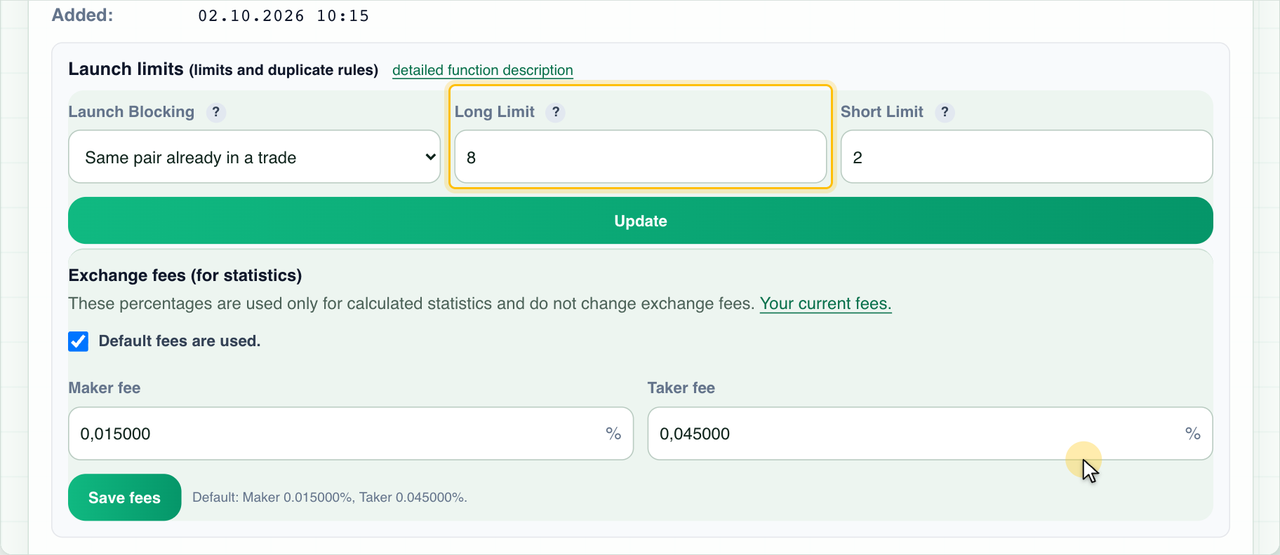
Limits are set in the API key settings, in the “Launch limits” block - separately for Long and for Short. If “Apply this limit to the API settings” is ticked in the Bots Wizard, the Long limit is applied automatically.
The pair blocking is set there too:
| Mode | What is blocked |
|---|---|
| Same pair already in a trade | While a coin has an open trade, a second bot on the same coin won’t start - neither Long nor Short. |
| Same pair and direction | Only a second bot in the same direction is blocked. Long and Short on one coin can run at the same time. |
| Do not block duplicates | No pair restriction. |
Pair blocking keeps you from doubling the risk on one coin. Besides, the exchange merges trades with the same pair and direction into one position, and on Hyperliquid, Long and Short on one pair can’t run at the same time.
More about launch limits:
Trading bot launch blocks: setting limits and preventing duplicate trades
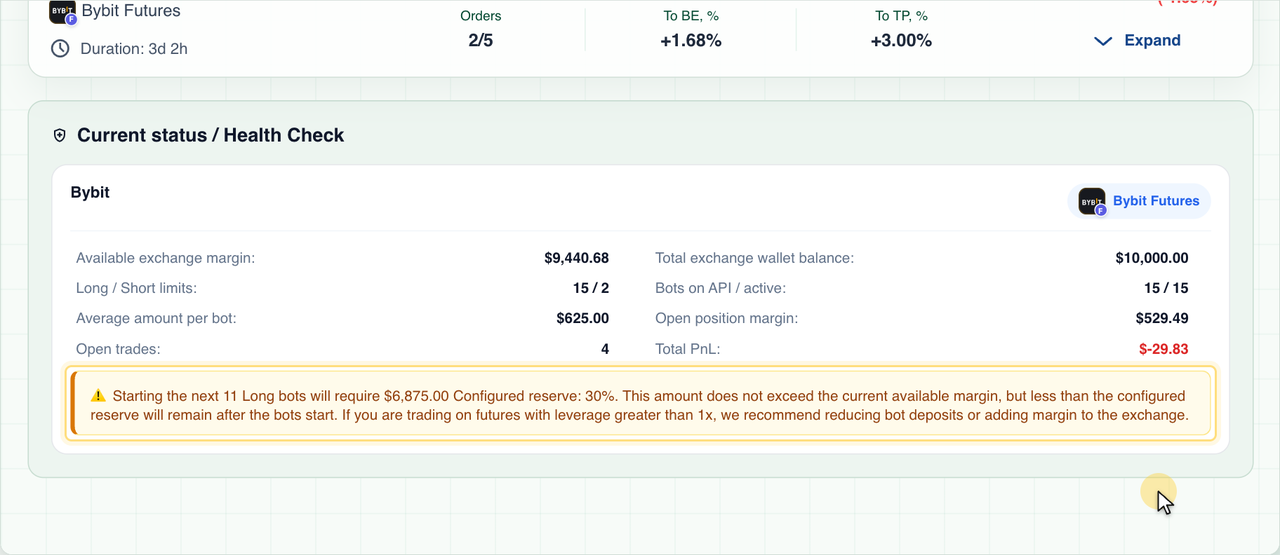
7. Health Check: checking your account
The Health Check helps you see whether everything is fine. It’s on the open trades page, in the Bots Wizard and in the bot form. It shows:
- Available exchange margin - how much money is still free for new orders;
- Total exchange wallet balance;
- Long / Short limits - the current limits;
- Bots on API / active;
- Average amount per bot;
- Open position margin;
- Open trades and their total PnL.
If the amounts on your bots are too large for your balance, the Health Check shows a warning. For example, if you raise the limit to 15 and keep $625 per bot, starting the next bots would need more margin than the reserve allows. In that case lower the bot deposits, bring the limit back or top up the account.
In short
- Leverage no more than 5x, 2x–3x for lower risk.
- A third to a half of the balance for the bots, the rest is the reserve.
- A concurrent trade limit equal to the one in your per-bot calculation.
- Check the Health Check regularly.
Open the Bots Wizard
https://elixoai.com/dexbots/botwizard.php